---
title: "Best Payroll Software Integrations with QuickBooks Online (2026 Guide)"
url: "https://satvasolutions.com/blog/top-payroll-software-integrates-with-quickbooks-online"
date: "2026-02-17T03:40:41+05:30"
modified: "2026-06-23T16:59:12+05:30"
author:
name: "Chintan Prajapati"
url: "https://satvasolutions.com"
categories:
- "Accounting Integration"
tags:
- "how to set up payroll in quickbooks online"
- "quickbooks payroll for small business"
- "quickbooks payroll software"
word_count: 4616
reading_time: "24 min read"
summary: "TABLE OF CONTENTS
Introduction
Why integrating payroll software with QBO
Gusto
QuickBooks Payroll
Paychex Flex
ADP WorkForce Now
Rippling Payroll
Conclusion
FAQs
..."
description: "Compare top payroll software that integrates with QuickBooks Online. Learn features, pricing, pros, cons, and integration tips to save hours every month."
keywords: "Payroll That Integrates with QuickBooks, how to set up payroll in quickbooks online, quickbooks payroll for small business, quickbooks payroll software"
language: "en"
schema_type: "Article"
---
# Best Payroll Software Integrations with QuickBooks Online (2026 Guide)
_Published: February 17, 2026_
_Author: Chintan Prajapati_
## Introduction
**Payroll management** is important to businesses of any size, and finding the right payroll software QuickBooks can considerably affect how your operation runs.
*Is your accounting platform is **QuickBooks Online,** and working with **Payroll**?*
That Integrates with **QuickBooks Payroll Software** will make that process easier and reduce much of the manual work involved with compliance regarding tax regulations.
*Payroll management is what makes any company, big or small, successful. Right?*
**QuickBooks integrations** are innovative for small business owners because they extend the capabilities of Intuit’s popular accounting program.
QuickBooks global payroll solutions go beyond making bookkeeping easier; they enhance coherence and productivity in workflow, smoothing many corporate operations like **payroll, payments, invoicing, and cost management**.
As businesses prepare for 2026, choosing the right payroll software that integrates with **QuickBooks Online Payroll software** can make payroll processing more accurate, scalable, and easier to manage.
### TL;DR Our 2026 Quick Picks
- **Best Overall:** [Gusto](#gusto-payroll) Best balance of payroll, HR, benefits, and QuickBooks integration
- **Best Native Integration:** [QuickBooks Payroll](#quickbooks-payroll) Zero-friction sync for QBO users
- **Best for Large/Scaling Teams:** [ADP Run](#adp-run) Enterprise-grade payroll with custom QB integration
- **Best Simple & Affordable:** [OnPay](#onpay) One plan, transparent pricing, excellent QB sync
- **Best Budget Option:** [Patriot Payroll](#patriot-payroll) Starts at just $17/mo
- **Best for Tech-Forward Teams:** [Rippling](#rippling-payroll) Unified HR + IT + Payroll with QB integration
## Why Integrating Payroll Software with QuickBooks Makes Sense?
- **Effortless data synchronization** across platforms ensures a smooth flow of information between systems.
- Manual errors are significantly reduced by automating repetitive payroll tasks and eliminating the need for manual data entry. Automation not only saves time but also improves accuracy when handling payroll calculations and tax-related information.
- Manual errors are significantly reduced by automating repetitive payroll tasks and eliminating the need for manual data entry. For businesses using **payroll that integrates with QuickBooks**, automation can save time, improve accuracy, and make it easier to manage payroll calculations and tax-related information.
- **Smarter project and client management** with unified data that empowers superior oversight and decision-making.
- **Holistic business insights** are possible because integrated tools give you a clearer, more accurate picture of the performance of your business.
For new users and longtime **QuickBooks** enthusiasts, the right integrations can transform how you manage your business.
## 5 Best Payroll Software That Work with QuickBooks Online
Below, we review the top 5 payroll solutions that work seamlessly with QuickBooks Online, helping you improve your payroll management and overall operations.
### Quick Comparison of Best Payroll Software That Work with QuickBooks
| Software | Starting Price (2026) | Best For |
|---|---|---|
| Gusto | $49/mo + $6/employee | SMBs needing HR + benefits |
| QuickBooks Payroll | $50/mo + $6/employee | QBO-native users |
| ADP Run | $79/mo + $4/employee | Scaling & enterprise teams |
| OnPay | $49/mo + $6/employee | Simple, transparent payroll |
| Paychex Flex | $39/mo + $5/employee | Multi-state payroll |
| Rippling | $35/mo + $8/employee | Tech-forward, fast-scaling |
| SurePayroll | $29.99/mo + $4.99/employee | Micro-businesses, nannies |
| Patriot Payroll | $17/mo + $4/employee | Budget-conscious businesses |
### Not Sure Which Payroll Software Fits Your QuickBooks Setup?
Choosing the right payroll tool depends on your employee count, payroll complexity, tax needs, HR requirements, and how cleanly payroll data syncs with QuickBooks Online.
[Get a Free Payroll Integration Review](https://satvasolutions.com/contact-us/?utm_source=blog&utm_medium=cta&utm_campaign=quickbooks_payroll_software&utm_content=payroll_integration_review)
## 1) Gusto Payroll
[**Gusto**](https://gusto.com/) is an **end-to-end payroll and HR solution** that simplifies employee management and automates payroll processing.
This streamlines **calculations, tax filings, and even payments** at the **federal, state, and local levels,** while ensuring businesses remain compliant with continuously changing regulations.
Beyond payroll, **Gusto** offers powerful tools to manage employee benefits, including **health insurance** and **401(k) retirement plans**, making it easier to offer competitive perks.
Gusto easily integrates with popular accounting software, such as **QuickBooks** and ***Xero*****,** allowing businesses to maintain more accurate financial records without dealing with duplicate data entry.
features
In one neat bundle, **Gusto** is ideal for those businesses that need an easy-to-use online platform that bundles **payroll, benefits administration**, and **HR functionality** in one convenient location.
### Gusto Payroll Features
| Feature | Description | Business Benefit |
|---|---|---|
| Automated Payroll | Automatically runs payroll, calculates taxes, and processes direct deposits. | Saves time and reduces manual payroll errors. |
| Benefits Management | Offers health insurance, 401(k), and employee benefits from one platform. | Simplifies benefits administration and improves employee retention. |
| Tax Filing | Automatically files federal, state, and local payroll taxes. | Reduces compliance risk and avoids late penalties. |
| Employee Onboarding | Digital offer letters, direct deposit setup, and electronic tax forms. | Faster onboarding with less paperwork. |
| Time Tracking | Employees log hours; managers approve timesheets before payroll runs. | Ensures accurate payroll processing and prevents discrepancies. |
| Compliance Support | Generates W-2s and 1099s and supports labor law compliance. | Helps maintain regulatory compliance across states. |
| Integrations | Connects with QuickBooks Online, Xero, and time-tracking apps. | Syncs accounting data automatically for better financial accuracy. |
**Active Users:** 400,000+ (till January 2026)**Video Source**: https://gusto.com/product/payroll
### Pros and Cons of Gusto Payroll:
#### Pros
- **Transparent Pricing:** Clear and simple pricing structure.
- **Flexible Plans:** Gusto payroll have three different plan options to meet different business needs.
- **Unlimited Payroll Runs:** Process payroll as often as needed without extra charges.
- **Contractor Payroll:** Gusto Payroll Supports both domestic and international contractors.
- **Charitable Giving Benefit:** Enables employees to donate directly from their paychecks.
- **Automatic Tax Filing:** Handles tax calculations, filings, and compliance.
- **Employee Wellness Tools:** These include financial resources and support for employees.
#### Cons
- **No Free Trial:** Does not offer a trial period for users to test the platform.
- **Costly at Scale:** Per-person pricing can become expensive as the team grows.
- **Limited Features:** Lacks invoicing and accounts receivable tools.
- **Manual Data Entry:** Requires significant initial setup time for inputting employee data.
- **Unsynced Data:** Benefits and time-off information don’t automatically sync across the platform.
- **No Automated Workflows:** Requires manual actions for certain HR processes.
- **No International Employee Payroll:** Only supports international contractor payments.
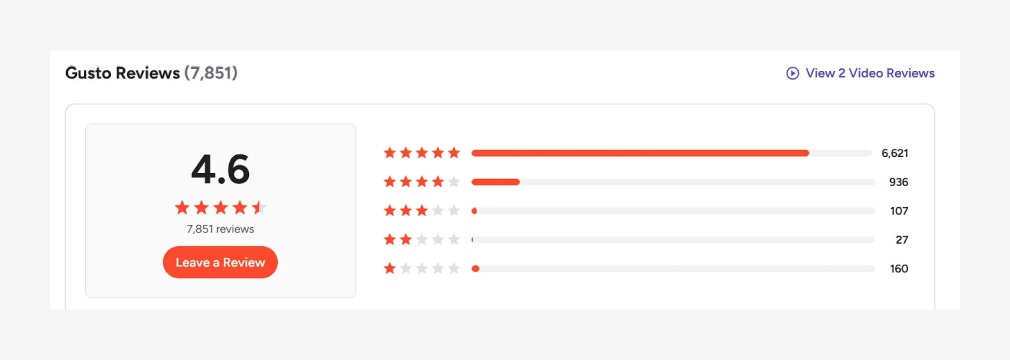
#### Gusto Pros & Cons Generated from Real G2 User Reviews
| Pros | User Reviews | Cons | User Reviews |
|---|---|---|---|
| Ease of Use | 3,975 | Missing Features | 468 |
| Simple | 2,065 | Poor Customer Support | 363 |
| Easy Setup | 2,093 | Login Issues | 355 |
| Payroll Ease | 1,912 | Limited Customization | 317 |
| User Interface | 1,826 | Time Tracking | 272 |
### Gusto Review from G2
### Gusto Payroll Pricing and Plans
#### Simple
$49per month+ $6/mo per person
#### Plus
$80per month+$12/mo per person
#### Premium
$180per month+$22/mo per person
You can visit Gusto’s official pricing page (https://gusto.com/product/pricing) to explore detailed breakdowns of their plans, features, and costs.
This page clearly outlines the differences between various **QuickBooks payroll software** subscription tiers, helping you compare what’s included in each plan, such as payroll processing, HR tools, employee benefits, and compliance support. This makes it easier to decide which option fits your business needs and budget.
### Why Custom Gusto Integration with QuickBooks Solutions is Needed:
A custom Gusto integration with QuickBooks is often required when standard **[QuickBooks payroll integrations](https://satvasolutions.com/quickbooks-integration-service)** do not fully meet business needs.
Unlike standard integrations, a custom solution ensures that specific workflows, business rules, and data management needs are addressed.
## 2) QuickBooks Payroll
[**QuickBooks Payroll**](https://quickbooks.intuit.com/payroll/) is a comprehensive solution designed to **streamline payroll management** for small to medium-sized businesses.
For businesses asking how to set up payroll in QuickBooks Online, QuickBooks Payroll offers a native and guided setup experience. It provides full-service payroll capabilities, including automated tax calculations, payments, and filings, helping businesses stay compliant with federal and state regulations.
With options for next-day or same-day direct deposit, it simplifies employee payments while also integrating employee benefits like health insurance and 401(k) plans.
The software integrates seamlessly with **QuickBooks Online,** providing businesses with a unified platform for both payroll and accounting. This makes it a strong choice for companies looking for **QuickBooks payroll software for small business** needs.
**QuickBooks Payroll** is user-friendly and mobile-accessible, making it convenient for business owners. Its customizable plans, from self-service to full-service options, cater to various business needs.
### QuickBooks Payroll Features:
| Feature | Details |
|---|---|
| **Automated Payroll** | Runs payroll automatically with scheduled payments and updates, reducing manual tasks. |
| **Tax Compliance** | Calculates, files, and pays federal, state, and local taxes automatically, ensuring compliance. |
| **Direct Deposit** | Offers next-day and same-day direct deposit options for quick employee payments. |
| **Employee Benefits** | Integrates with health insurance, retirement plans, and other benefits for easy management. |
| **Time Tracking** | Syncs employee hours through integration with QuickBooks Time (formerly TSheets) for accurate payroll. |
| **Customizable Payroll Plans** | Offers flexible plans that scale with the business, from self-service to full-service payroll. |
| **Mobile Access** | Allows users to run payroll and manage tasks on the go through the mobile app. |
| **30-Day Free Trial** | All plans offer a 30-day free trial so you can test the platform before committing. |
### QuickBooks Payroll: Pros & Cons
#### Pros:
- **Unlimited Payroll Runs:** Process payroll as often as needed without restrictions.
- **Automated Tax Management:** Automatically calculates, files, and pays federal and state taxes, ensuring compliance.
- **Availability in All 50 States:** Supports payroll processing across all U.S. states.
- **Garnishment Management:** Easily manage employee garnishments as part of payroll.
- **Robust Reporting:** Offers detailed and customizable reports to track payroll, taxes, and more.
#### Cons:
- **Higher Cost:** More expensive than many leading competitors.
- **Time Tracking Limited:** Only available in top-tier plans (Premium and Elite).
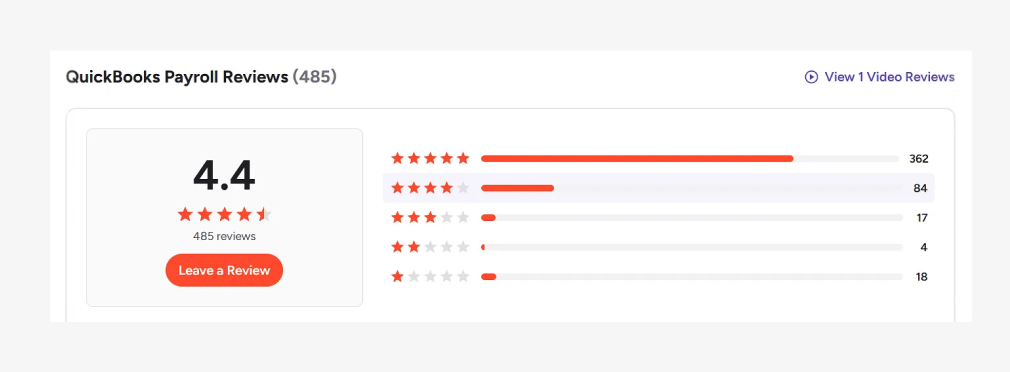
#### QuickBooks Payroll Pros & Cons Generated from Real G2 User Reviews
### Updated Pros & Cons Table (Latest User Reviews)
| Pros | User Reviews | Cons | User Reviews |
|---|---|---|---|
| Payroll | 3 | Poor Customer Support | 3 |
| Integrations | 3 | Inadequate Verification | 1 |
| Ease of Use | 3 | Clarity Issues | 1 |
| Customizability | 2 | Change Management | 1 |
| Automation | 1 | Account Management Issues | 1 |
### QuickBooks Payroll Pricing and Plans:
#### QuickBooks Payroll Review from G2
#### Core + QuickBooks Simple
$44 per month+$6.50/employee
per month
#### Core + QuickBooks Essentials
$62.50 per month+$6.50/employee
per month
#### Premium + QuickBooks
Plus
$101.50 per month+$10/employee
per month
You can check out QuickBooks Payroll’s official pricing page (https://quickbooks.intuit.com/payroll/pricing/) to review a complete breakdown of their available plans, features, and monthly costs.
The page highlights what each tier includes such as automated payroll, tax filings, direct deposit, HR support, and benefits options.
So you can easily compare plans and choose the one that aligns with your company’s size, payroll complexity, and compliance requirements.
### Why QuickBooks Payroll May Need Custom Integration with QuickBooks
Although **QuickBooks Payroll** integrates natively with **QuickBooks,** certain businesses may encounter limitations in the standard integration that make custom QuickBooks Payroll integration essential.
Here are the primary reasons why a custom integration might be needed:
- Unique Payroll Processes
- Compatibility with Non-Standard Workflows
- Advanced Reporting Needs
- Multiple Systems Involved
- Handling High Transaction Volumes
- Localization and Tax Compliance
In such cases, leveraging **QuickBooks payroll API**–based or custom integration approaches helps businesses maintain accuracy, flexibility, and scalability.
## 3) Paychex Flex
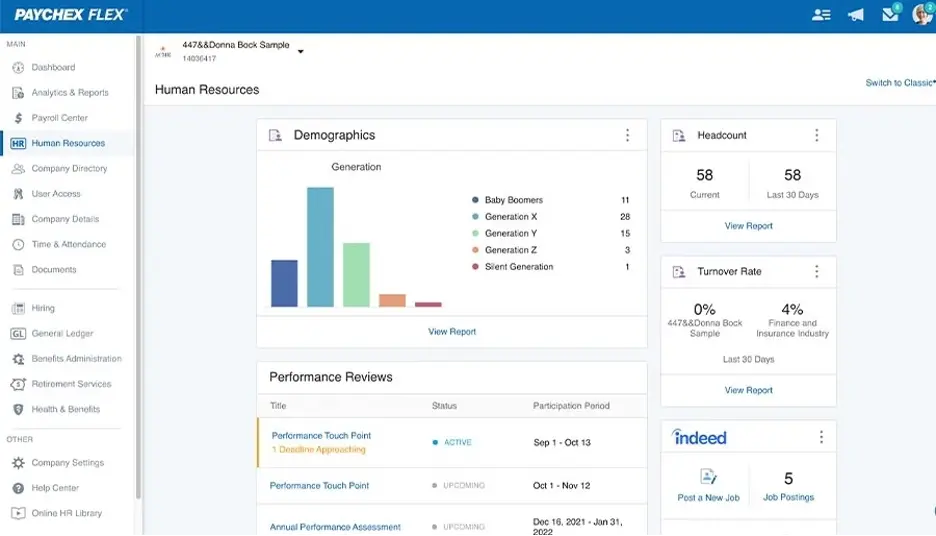
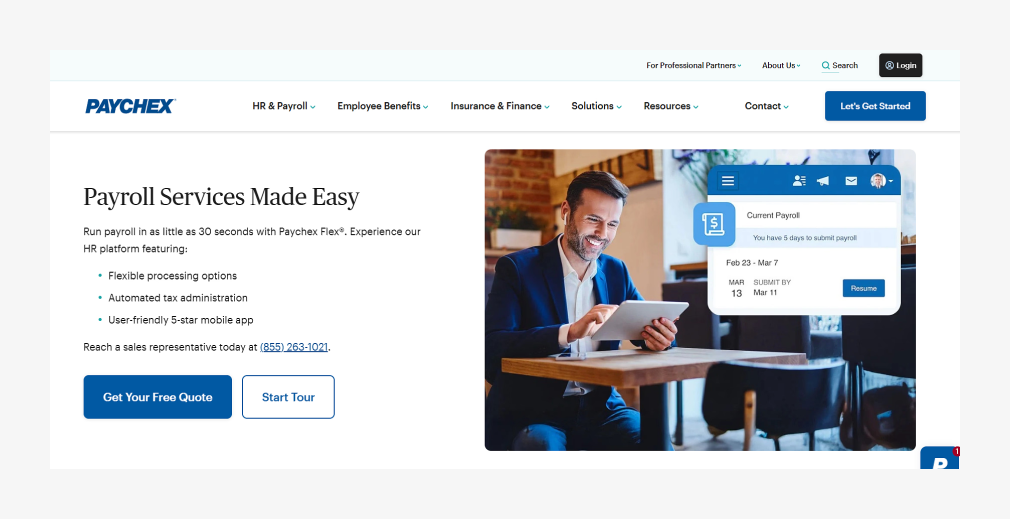[**Paychex Flex**](https://www.paychex.com/) is a simple employee payroll platform for small businesses, offered as an alternative to the more complex **Paychex** platform for larger businesses.
**It provides just what small businesses need:** easy employee payroll.
Beyond that, the platform’s offerings are pretty slim compared with Paychex’s competitors though **Paychex** offers a suite of integrated products you could purchase to meet your needs under one brand.
### Paychex Flex Features:
| Feature | Details |
|:--|:--|
| **Ease of Use** | Simple for small businesses, but pricing is complex with customizable plans. |
| **Compliance** | Ensures state and local tax filing, includes new hire reporting and provides labor law posters. |
| **Tax Filing** | Automatically calculates, pays, and files payroll taxes. |
| **Time Tracking** | This is not included but can be added through Paychex Flex Time with a mobile app or kiosk. |
| **Analytics and Reporting** | Custom analytics and reporting are available in the Pro plan; basic plans lack reports. |
| **Payroll** | Runs payroll and processes payments via direct deposit or printed checks. |
| **Pay Contractors** | Pays contractors via direct deposit or printed checks; contractors access pay info via the portal. |
| **Time Tracking (Add-on)** | Paychex Flex Time tracks attendance, mileage, and hours; additional cost for this feature. |
| **Taxes and Compliance** | Automatic tax calculations, filing, and access to labor compliance posters. |
| **Active User** | Paychex Flex has around 2.5 million daily users who perform various tasks, including payroll, time tracking, performance reviews, and benefits enrollment. This amounts to 16.5 million sessions per month. |
### Paychex Flex: Pros & Cons
#### Pros:
- Simplified payroll process for employees.
- Garnishment payment service is available on select plans.
- Flexible and customizable plans for various business requirements.
- Automatic tax filing and calculations included.
- Integration with accounting software and support for voice assistants.
#### Cons:
- Additional fees for W-2 and 1099 filings.
- Time tracking requires an extra platform (Paychex Flex Time).
- Customer support can be improved.
#### Paychex Flex Pros & Cons Generated from Real G2 User Reviews
### Updated Pros & Cons Table (Latest User Reviews)
| Pros | User Reviews | Cons | User Reviews |
|---|---|---|---|
| Ease of Use | 81 | Poor Customer Support | 40 |
| Payroll Management | 49 | Payroll Issues | 28 |
| Helpful | 48 | Expensive | 22 |
| Payroll | 43 | Poor Support Services | 18 |
| Customer Support | 38 | Not User-Friendly | 18 |
### Paychex Flex Pricing Plans
#### Paychex Flex® Select
Get a Quote
#### Paychex Flex® Pro
Get a Quote
#### Paychex Flex® Enterprise
Get a Quote
To explore Paychex payroll pricing options, you can visit their package page (https://www.paychex.com/payroll/compare-payroll-solutions), where they outline the different payroll solutions available for businesses of varying sizes.
Instead of publishing standard pricing tiers, the page explains the services included in each offering such as payroll processing, tax handling, HR assistance, and compliance support. It’s designed to help businesses assess which solution fits their operational needs, after which you can connect with their team to receive customized pricing details.
### Why Paychex Flex Payroll Software May Need Custom Integration with QuickBooks
Paychex Flex is a robust QuickBooks payroll software for small business and mid-sized organizations, supporting payroll processing, tax management, and employee benefits across industries.
However, the standard integration between Paychex Flex and QuickBooks may be limited for businesses with unique workflows or advanced reporting needs**.**
A custom integration bridges these gaps, offering tailored solutions for better financial management.
### Reasons for Custom Integration May Be Required:
- Advanced Data Mapping between payroll and accounting systems
- Multi-System Compatibility across HR, ERP, and finance platforms
- Real-Time Data Synchronization using custom workflows or the QuickBooks payroll API
- Handling Complex Payroll Structures such as multiple pay schedules or departments
- Advanced Reporting and Analytics beyond standard payroll reports
- Industry-Specific Requirements aligned with **QuickBooks payroll software** by industry
## 4) ADP Run Best for Large & Scaling Teams
ADP Workforce Now is an all-in-one Human Capital Management (HCM) solution designed to support businesses of all sizes with payroll, HR, benefits, and talent management from a single platform.
The platform helps businesses automate routine payroll tasks such as wage calculations, tax filings, and compliance tracking. In addition, it offers advanced capabilities including employee self-service, workforce analytics, and compliance management, making it suitable for organizations with growing operational complexity.
It integrates seamlessly with various third-party apps and provides robust reporting capabilities to help companies make informed HR decisions.
**ADP Workforce Now** is highly customizable and scalable, making it ideal for businesses looking to streamline their HR and payroll functions as they grow.
### ADP WorkForce Now Features & Benefits:
| Feature | Details |
|:--|:--|
| **Payroll Management** | Automates payroll processing, tax calculations, and filings. |
| **HR Management** | Offers comprehensive tools for employee data management, benefits, and onboarding. |
| **Time and Attendance** | Tracks employee hours and integrates with payroll for accurate calculations. |
| **Benefits Administration** | Manages employee benefits like health insurance, 401(k), and other perks. |
| **Talent Management** | Includes tools for recruiting, performance reviews, and employee development. |
| **Custom Reporting** | Provides advanced reporting features for workforce analytics and business insights. |
| **Active User** | ADP serves over 1 million clients worldwide, ranging from small businesses to large enterprises. While the exact number of active users isn’t explicitly stated, ADP’s global footprint includes services in over 140 countries, catering to millions of employees who rely on its payroll and human capital management solutions daily. Their platforms integrate with numerous systems and apps, demonstrating a vast and scalable user base across industries. |
#### ADP WorkForce Pros & Cons Generated from Real G2 User Reviews
| Pros | Cons |
|---|---|
| Ease of Use | 152 | Poor Customer Support | 75 |
| Helpful | 78 | Poor Support Services | 46 |
| Features | 67 | Technical Issues | 46 |
| Comprehensive Features | 62 | Missing Features | 43 |
| Payroll | 58 | Difficulty | 36 |
### Pricing
- **Pricing:** This is not found in the application. You need to get pricing according to their needs.
- **Account:** Free trial is not available; you need to have an account.
### ADP QuickBooks Integration:
Yes, you can do a custom integration with QBO with the “Run Powered ADP.”
## 5) Rippling Payroll
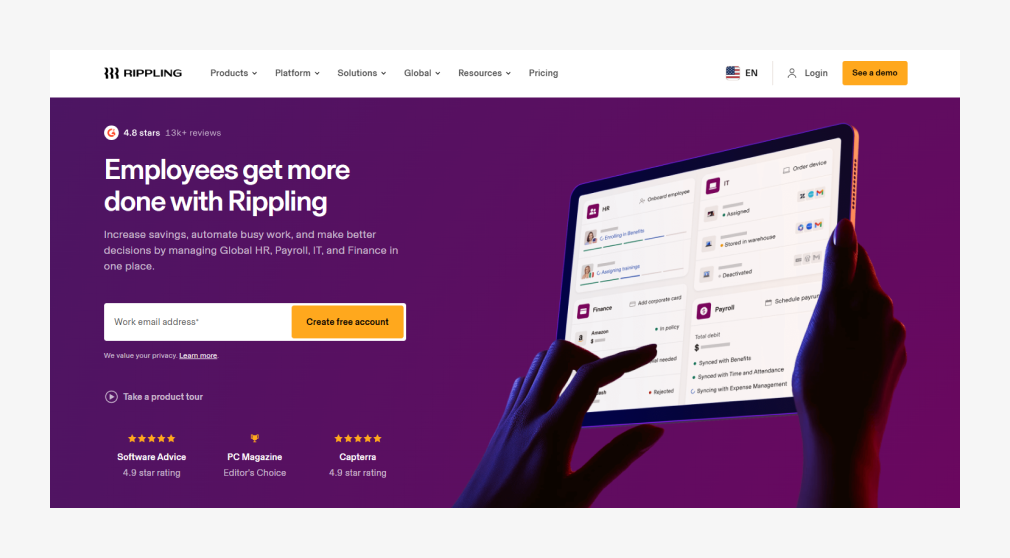**Rippling** is a unified platform that combines HR, IT, and payroll management in one system, making it a comprehensive solution for businesses.
With **[Rippling QuickBooks integration](https://www.rippling.com/lp/paid-payroll-in),** It automates and streamlines various administrative tasks.
Like payroll processing, benefits administration, time tracking, and employee onboarding.
Additionally, **Rippling** stands out by managing employee devices and apps alongside HR tasks and offering seamless integration with third-party software.
This all-in-one system is highly customizable and scalable, suitable for businesses of all sizes, especially those looking for a versatile tool to manage workforce operations and IT needs.
**Rippling** also provides strong compliance features, automating tax filings and ensuring businesses stay updated with federal and state regulations.
### Features & Benefits:
| Feature | Details |
|:--|:--|
| **Payroll Management** | Automates payroll processing, tax filings, and compliance across all 50 U.S. states and internationally. |
| **HR Management** | Manages employee data, onboarding, offboarding, benefits, and performance tracking within a single platform. |
| **IT Management** | It automates the setup and management of employee devices, software, and apps, such as Slack, Google Workspace, and Office 365. |
| **Benefits Administration** | This department streamlines employee benefits management, including health insurance, 401(k) plans, and workers’ compensation. |
| **Time and Attendance** | Tracks employee work hours, integrates with payroll, and manages paid time off (PTO) and scheduling. |
| **App and Device Management** | This position sets up and manages employee access to company tools and applications, including onboarding and offboarding workflows. |
#### Rippling Pros & Cons Generated from Real G2 User Reviews
### Updated Pros & Cons Table (Latest User Reviews)
| Pros | User Reviews | Cons | User Reviews |
|---|---|---|---|
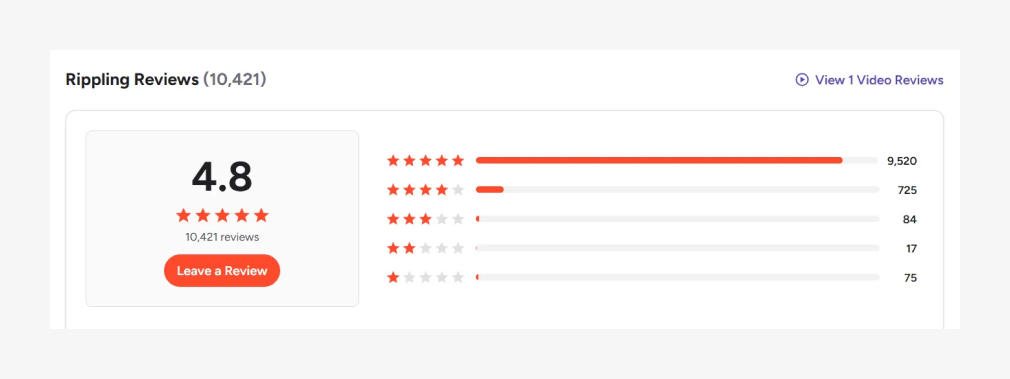
| Ease of Use | 5,970 | Missing Features | 1,011 |
| Intuitive | 4,491 | Not User-Friendly | 726 |
| Simple | 3,856 | Navigation Difficulty | 683 |
| User Interface | 3,305 | Learning Curve | 674 |
| Easy Access | 3,168 | Limited Features | 635 |
### Pricing
#### Rippling Payroll Review from G2
- **Pricing:** For pricing, you need to request a quote.
- **Account:** It doesn’t allow you to create an account. You can schedule a 30-minute demo.
## 6) OnPay Best Simple & Affordable Payroll for QuickBooks (2026)
[**OnPay**](https://onpay.com/) is a **full-service payroll platform** that stands out for its simplicity: one plan, one price, all features included. There are no tiers to compare, no features locked behind paywalls, and no hidden fees.
OnPay’s **QuickBooks Online integration** automatically syncs payroll data including wages, tax payments, and deductions directly to your chart of accounts. The setup is straightforward and the sync is reliable.
In 2026, OnPay continues to be a top choice for small businesses that want professional-grade payroll with QuickBooks integration without the complexity of multi-tier platforms.
### OnPay Key Features (2026):
| Feature | Details |
|---|---|
| **Full-Service Payroll** | Unlimited payroll runs with automated tax calculations and direct deposit. |
| **Tax Filing** | Federal, state, and local tax filing in all 50 states with an error-free guarantee. |
| **Benefits** | Health insurance, dental, vision, 401(k), and workers’ comp integration. |
| **HR Tools** | Employee onboarding, document storage, PTO tracking, and org charts included. |
| **Multi-State Payroll** | No extra charge for filing taxes in multiple states included in the base price. |
| **QuickBooks Integration** | Direct two-way sync with QBO for payroll journal entries and tax data. |
### OnPay: Pros & Cons (2026)
#### Pros:
- **Simple Pricing:** One plan at $49/mo + $6/person no tiers, no upsells.
- **No Multi-State Fees:** File taxes in as many states as you need at no extra cost.
- **Error-Free Guarantee:** OnPay covers penalties if they make a tax filing mistake.
- **Excellent QuickBooks Sync:** Clean, reliable integration with QBO.
- **Free Setup & Migration:** OnPay will migrate your payroll data from your previous provider at no charge.
- **First Month Free:** Try OnPay free for your first month.
#### Cons:
- **Limited Scalability:** Best suited for businesses under 100 employees.
- **No IT Management:** Unlike Rippling, doesn’t handle device or app provisioning.
- **Basic Reporting:** Reporting is functional but less advanced than ADP or Paychex.
- **No International Payroll:** U.S.-only payroll (no global contractor payments).
### OnPay Pricing (2026)
#### One Plan Everything Included
$49 per month+ $6/person per month
Visit [OnPay pricing](https://onpay.com/payroll/software/costs-pricing/) for full details. First month is free.
## 7) SurePayroll Best for Micro-Businesses & Household Employers (2026)
[**SurePayroll**](https://www.surepayroll.com/) (a Paychex company) is a **straightforward, no-frills payroll service** designed for very small businesses, household employers, and self-employed individuals. It offers both self-service and full-service payroll options at competitive prices.
SurePayroll integrates with QuickBooks Online through an accounting integration add-on ($5/month), syncing payroll data to your general ledger.
### SurePayroll Key Features (2026):
| Feature | Details |
|---|---|
| **Payroll Processing** | Unlimited monthly payroll runs with direct deposit and check printing. |
| **Tax Filing** | Full-service option handles all federal, state, and local tax calculations and filings. |
| **Nanny/Household Payroll** | Specialized plans for household employers (nannies, housekeepers, caregivers). |
| **Mobile App** | Run payroll, view reports, and manage employees from a mobile-friendly interface. |
| **QuickBooks Integration** | Accounting integration add-on syncs payroll data to QBO ($5/month extra). |
### SurePayroll: Pros & Cons (2026)
#### Pros:
- **Affordable:** Full-service payroll starting at $29.99/mo + $4.99/employee.
- **Self-Service Option:** Budget plan at $20/mo + $4/employee if you handle your own taxes.
- **No Contracts:** Cancel anytime with no penalties.
- **Household Payroll:** Specialized nanny/household employer plans.
- **2-Day Direct Deposit:** Fast payment processing for employees.
#### Cons:
- **QB Integration Costs Extra:** QuickBooks sync is a $5/month add-on, not included.
- **Limited HR Features:** No benefits administration, onboarding, or employee self-service portal.
- **Multi-State Fees:** $10/month per additional state for tax filing.
- **Year-End Costs:** W-2/1099 filing costs $45 + $4/employee extra.
### SurePayroll Pricing (2026)
#### Self-Service
$20 per month+ $4/employee per month
#### Full-Service
$29.99 per month+ $4.99/employee per month
Visit [SurePayroll pricing](https://www.surepayroll.com/pricing) for full details. 30-day free trial available.
## 8) Patriot Payroll Best Budget Option for QuickBooks Users (2026)
[**Patriot Payroll**](https://www.patriotsoftware.com/) is the **most affordable payroll software** on this list, making it ideal for very small businesses and startups that need reliable payroll with QuickBooks integration without breaking the bank.
Patriot offers a direct integration with QuickBooks Online that syncs payroll data automatically. The platform is U.S.-based, handles payroll for businesses with 1–500 employees, and offers both basic (self-service tax) and full-service tax filing options.
### Patriot Payroll Key Features (2026):
| Feature | Details |
|---|---|
| **Payroll Processing** | Unlimited payroll runs with direct deposit, printed checks, and pay stubs. |
| **Tax Filing** | Basic plan: you file taxes. Full Service plan: Patriot handles all federal, state, and local tax filings. |
| **Employee Portal** | Employees can access pay stubs, W-2s, and update their information online. |
| **Time & Attendance** | Add-on module ($2/employee/mo) for tracking hours, PTO, and overtime. |
| **HR Add-On** | Basic HR module ($2/employee/mo) for document storage, onboarding, and compliance tracking. |
| **QuickBooks Integration** | Direct integration syncing payroll data to QuickBooks Online automatically. |
### Patriot Payroll: Pros & Cons (2026)
#### Pros:
- **Most Affordable:** Basic payroll starts at just $17/mo + $4/employee the lowest on this list.
- **30-Day Free Trial:** Test the full platform before committing.
- **No Monthly Charge When Not Running Payroll:** Only pay the base fee in months you don’t process payroll.
- **U.S.-Based Support:** Free phone and email support from a U.S.-based team.
- **Direct QuickBooks Integration:** Clean sync with QBO included at no extra charge.
#### Cons:
- **Limited Benefits:** No built-in health insurance, 401(k), or benefits administration.
- **Basic HR Only:** HR features are limited to a simple add-on module.
- **No International Payroll:** U.S.-only payroll processing.
- **Add-On Costs:** Time tracking and HR modules each cost an extra $2/employee/month.
### Patriot Payroll Pricing (2026)
#### Basic Payroll
$17 per month+ $4/employee per month
#### Full Service Payroll
$37 per month+ $5/employee per month
Visit [Patriot pricing](https://www.patriotsoftware.com/pricing/) for full details. 30-day free trial with no setup fees.
### Need QuickBooks Payroll Integration Help?
Make payroll easier to manage with a custom QuickBooks Online integration built around your business workflow.
[Talk to a QuickBooks Integration Expert](https://satvasolutions.com/contact-us/?utm_source=blog&utm_medium=cta&utm_campaign=quickbooks_payroll_software&utm_content=talk_to_a_quickbooks_integration_expert)
## Conclusion: Choosing the Best Payroll Software for QuickBooks Online in 2026
Choosing the right payroll software that integrates with **QuickBooks Online** is one of the most impactful operational decisions your business can make in 2026. The right integration eliminates manual data entry, reduces compliance risk, and gives you a unified view of your labor costs and tax liabilities.
Here’s a quick summary of our recommendations:
- **Best Overall:** [Gusto](https://gusto.com/) Best balance of features, pricing, and QuickBooks integration quality.
- **Best Native Integration:** [QuickBooks Payroll](https://quickbooks.intuit.com/payroll/) Zero-friction for existing QBO users.
- **Best for Scaling Teams:** [ADP Run](https://www.adp.com/) Enterprise-grade with a clear upgrade path.
- **Best Simple Option:** [OnPay](https://onpay.com/) One plan, all features, transparent pricing.
- **Best Budget Pick:** [Patriot Payroll](https://www.patriotsoftware.com/) Full payroll from just $17/month.
For businesses with unique workflows, multi-system environments, or industry-specific compliance requirements, **custom [QuickBooks integration services](https://satvasolutions.com/quickbooks-integration-service)** can bridge the gaps that standard integrations leave behind. Whether you need custom GL mapping, automated reconciliation, or multi-entity payroll consolidation, a tailored integration ensures your payroll and accounting data stay perfectly in sync.
Need help choosing the right payroll integration or building a custom QuickBooks solution? Explore our [accounting automation solutions](https://satvasolutions.com/accounting-automation-solutions) to see how we can help streamline your operations.
## FAQs
### What is the best payroll software for QuickBooks Online?
The best payroll software for **QuickBooks Online** depends on your business size and payroll complexity. **QuickBooks Payroll** works well for small businesses, while third-party tools like **Gusto**, **Paychex**, and **ADP** offer more advanced HR features, compliance support, and scalability.
### Does QuickBooks Online include payroll software?
**QuickBooks Online** does not automatically include payroll, but it offers **QuickBooks Payroll** as a paid add-on. Once activated, it allows businesses to run payroll, calculate taxes, file federal and state taxes, and generate W-2 and 1099 forms.
### What payroll integrates best with QuickBooks Online?
Payroll software that integrates best with **QuickBooks Online** includes **QuickBooks Payroll**, **Gusto**, **Paychex**, **ADP**, and **OnPay**. These solutions sync payroll data automatically, reducing manual entries and accounting errors.
### Is QuickBooks Payroll good for small businesses?
Yes, **QuickBooks Payroll** is a strong option for small businesses already using **QuickBooks Online**. It provides automated payroll processing, direct deposit, tax calculations, and seamless accounting synchronization.
### Are there QuickBooks payroll apps available?
Yes, there are multiple payroll apps available through the **QuickBooks App Store**. These apps integrate with **QuickBooks Online** to manage payroll, taxes, time tracking, and employee benefits.
### Does Paychex integrate with QuickBooks?
Yes, **Paychex** integrates with both **QuickBooks Online** and **QuickBooks Desktop**. The integration allows payroll data, including wages and taxes, to sync automatically into your accounting system.
### What payroll software is best for small businesses using QuickBooks?
The **best payroll software for QuickBooks** depends on your budget, employee size, and the level of payroll support you need. **QuickBooks Payroll** is ideal for small businesses seeking simplicity, while **Gusto** and **OnPay** are popular options for added HR and benefits features.
### What is the difference between QuickBooks Payroll and third-party payroll software?
**QuickBooks Payroll** is built directly into **QuickBooks Online** and offers seamless accounting integration. Third-party payroll software integrates via API and typically provides more advanced HR tools, compliance management, and employee benefits administration features.
### Can I use ADP with QuickBooks Online?
Yes, **RUN Powered by ADP** integrates with QuickBooks Online through an API-based connection. Once configured, payroll data including wages, tax payments, deductions, and employer contributions syncs automatically to your QBO general ledger. The integration requires initial setup and GL account mapping.
### What is the cheapest payroll software that works with QuickBooks?
**Patriot Payroll** is the most affordable option at $17/month + $4/employee for basic payroll with QuickBooks integration. For full-service tax filing, Patriot charges $37/month + $5/employee. SurePayroll is another budget option at $29.99/month + $4.99/employee with full-service tax filing included.
### Is Gusto better than QuickBooks Payroll?
**Gusto is better for businesses that need comprehensive HR, benefits administration, and employee onboarding tools alongside payroll**. It offers health insurance, 401(k), workers’ comp, and a full onboarding suite that QuickBooks Payroll lacks. QuickBooks Payroll is better if you want the simplest possible integration with QBO and don’t need advanced HR features. Both offer full-service tax filing and unlimited payroll runs.
### How do I integrate payroll with QuickBooks?
Most payroll tools offer direct or API-based integration with QuickBooks Online. The process typically involves: (1) connecting your QBO account from within the payroll platform, (2) mapping your payroll accounts to your QBO chart of accounts, and (3) enabling automatic sync so payroll journal entries, tax payments, and deductions flow into your books after each payroll run. Tools like Gusto, OnPay, and QuickBooks Payroll handle this automatically with minimal setup.
---
_View the original post at: [https://satvasolutions.com/blog/top-payroll-software-integrates-with-quickbooks-online](https://satvasolutions.com/blog/top-payroll-software-integrates-with-quickbooks-online)_
_Served as markdown by [Third Audience](https://github.com/third-audience) v3.5.4_
_Generated: 2026-06-23 11:29:12 UTC_